The complete RG2030 dashboard guide for new users: Time Left, Auto Collect, Spin Analysis, Stats, the table, Settings and Win Rate, Autobet and what each Pack unlocks.

RG2030 Dashboard User Guide: Every Part and Button Explained
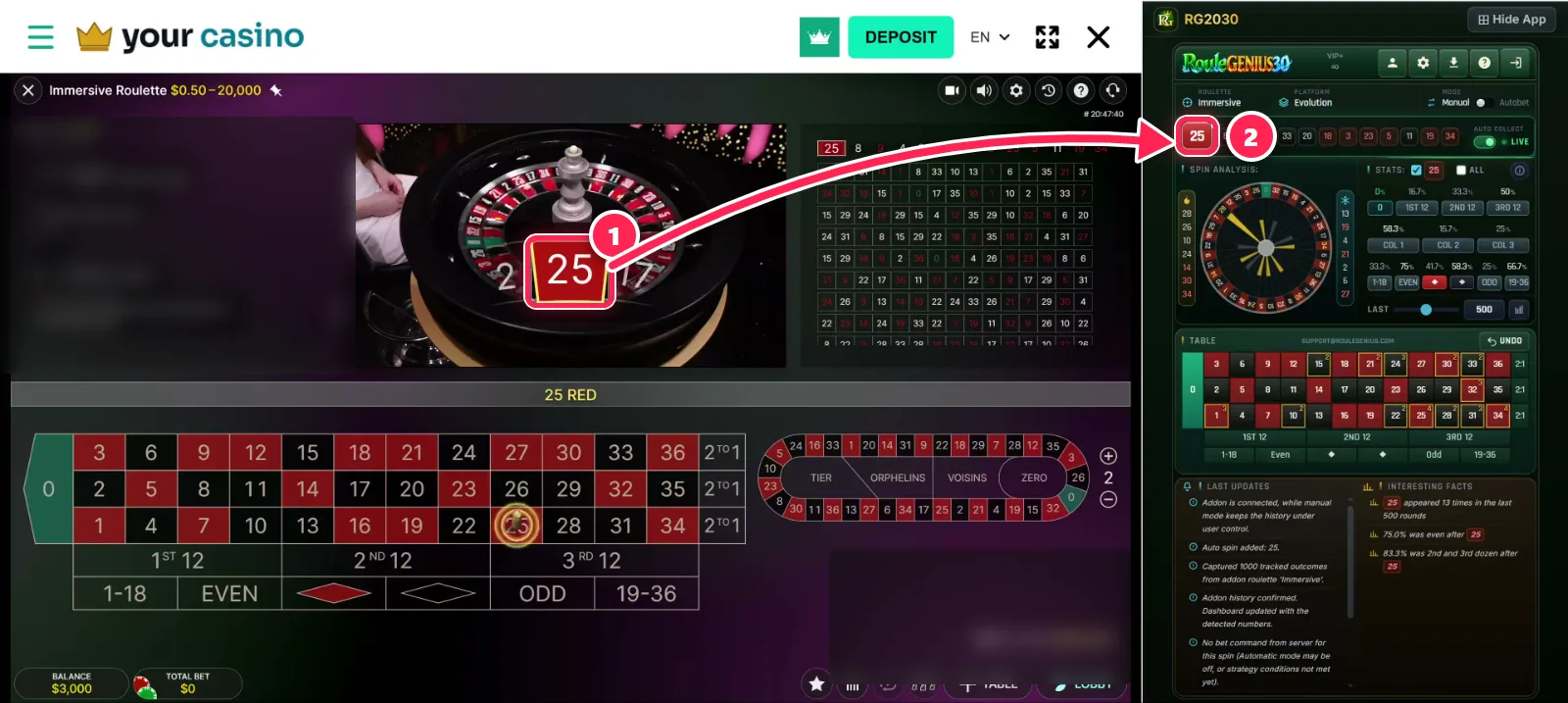
This guide is for you if you have just bought RG2030 minutes. It explains the RG2030 dashboard from top to bottom: what each part shows, which buttons you can click, and how to use them. Every picture comes from a real session. The red numbers in each picture match the numbers in the text.
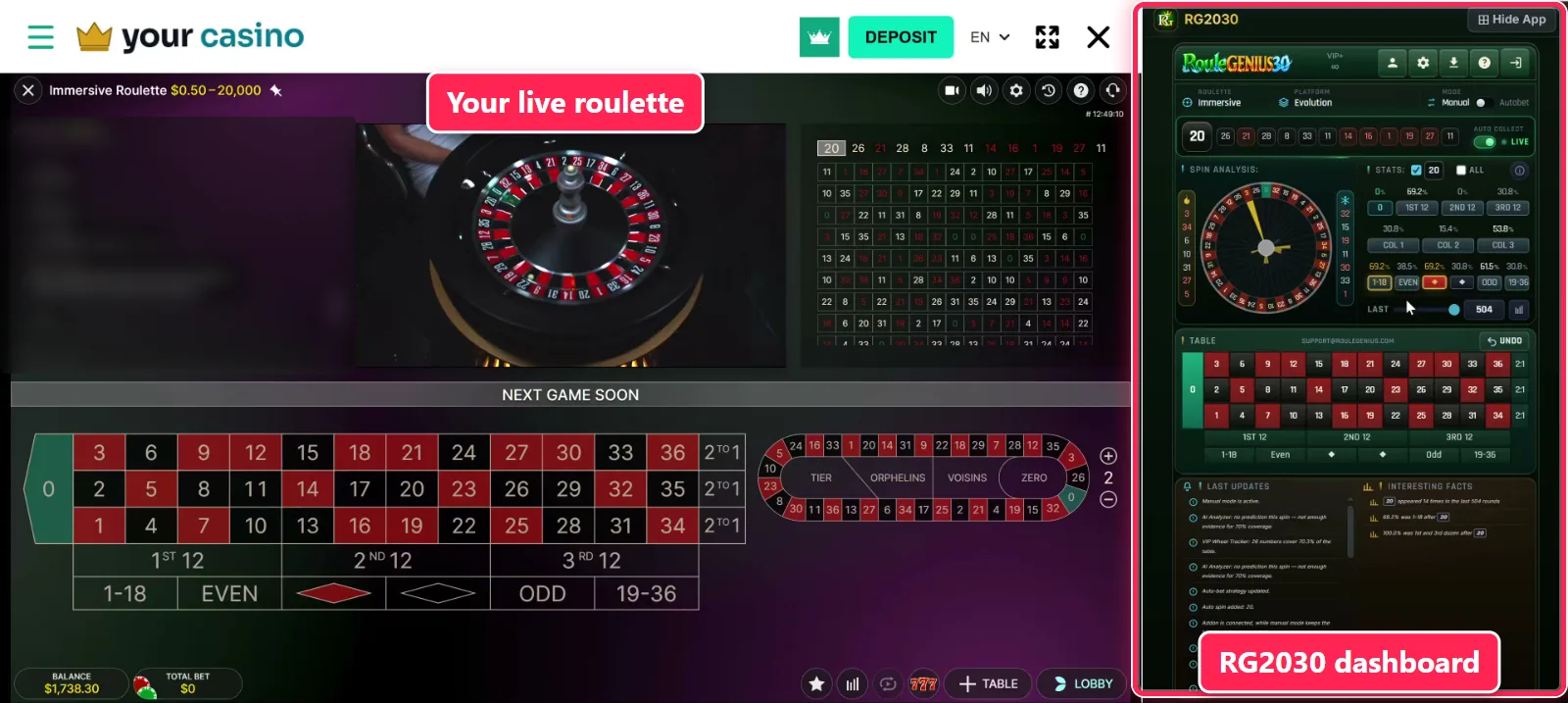
Open it in any browser
On a computer, tablet or phone: go to roulegenius.com, click Login and sign in. You add each new number with one click on the RG2030 table.
Or inside the RG2030 Bridge
On a computer with Chrome: click Show App in the Bridge. The numbers arrive by themselves, and from the Premium Pack Autobet can place the bets. See the Bridge guide.
Before your first session
- A roulette profile is active: its name is shown under Roulette at the top. No profile yet? RG2030 opens the profile window for you (part 9).
- RG2030 has 500 numbers of that table. Statistics and predictions start from 500. Collecting them is free: your minutes do not run.
- You have minutes on your account (see the Packs).
- 1. The dashboard at a glance
- 2. Top bar and Time Left
- 3. Roulette, Platform, Mode
- 4. Latest numbers, Auto Collect
- 5. Spin Analysis
- 6. Stats
- 7. Table
- 8. Last Updates, Interesting Facts
- 9. Menus and Settings
- 10. Autobet
- 11. What each Pack unlocks
- 12. Questions
1The dashboard at a glance
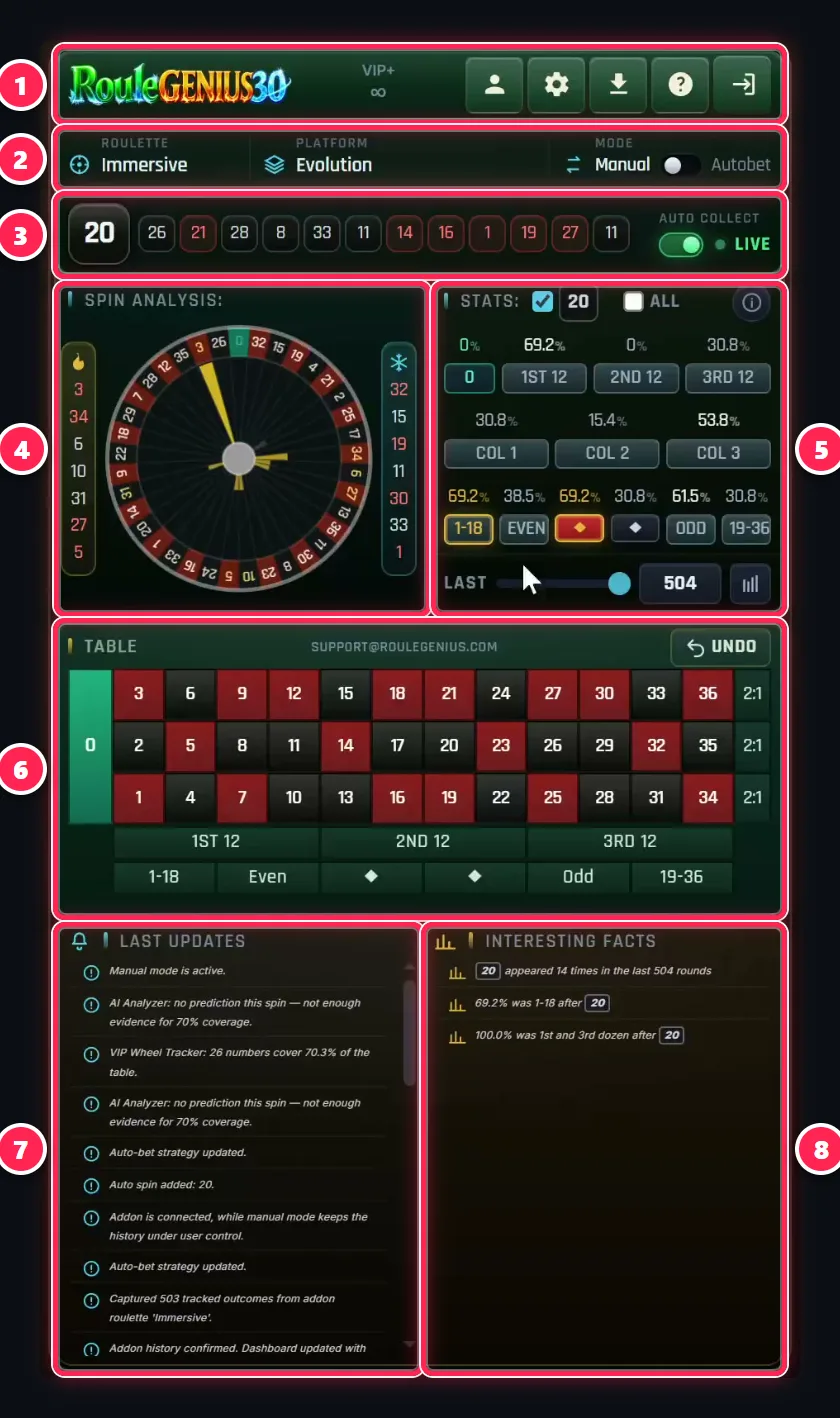
The dashboard always fits in one screen: you never scroll. When something needs more room, it opens in a window over the dashboard, with an × or a Save button to close it.
- Top bar: menus and your minutes.
- Roulette · Platform · Mode: the table you play and the Manual / Autobet switch.
- Latest numbers and the Auto Collect switch.
- Spin Analysis: hot numbers, the wheel, cold numbers.
- Stats: the percentages of every outside bet.
- Table: add numbers by hand and see the suggested numbers.
- Last Updates: what RG2030 is doing, in plain words.
- Interesting Facts: what usually came after the last number.
2Top bar and Time Left

- Logo: opens My Account.
- Time Left: the play minutes on your account (VIP+ shows
∞, unlimited). - My Account (person icon): your Pack, profiles, Secrets, Interface.
- Settings (gear): strategy, Win Rate and bet system.
- Install Addon (download arrow): download the RG2030 Bridge for Chrome.
- Guide (question mark): useful links and tutorials.
- Logout: signs you out at once, everywhere (also in the Bridge and on other devices).
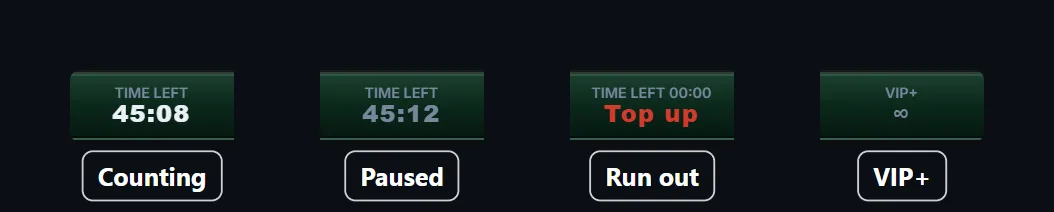
When do the minutes run? Only while RG2030 gives you statistics and predictions: you have minutes and 500 numbers on the active table. Then they run while the dashboard is in front of you, or while the Bridge works on your table.
- Grey: paused. The timer starts when predictions are on.
- Red: the last minute.
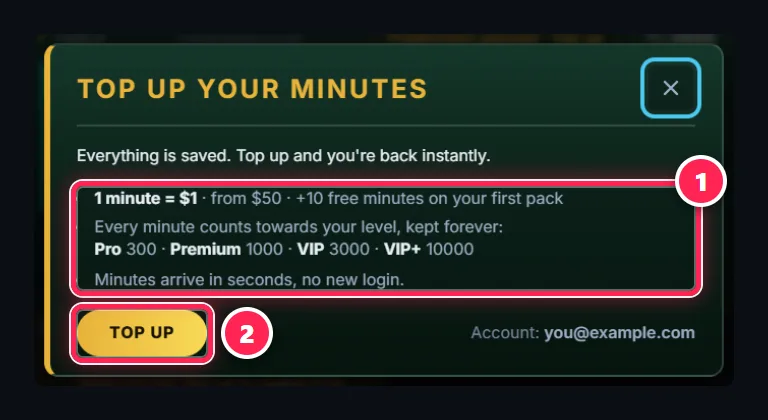
Top up: your minutes are used up. Click it to buy more. Everything you collected stays saved, and the dashboard unlocks again a few seconds after the payment, without signing in again.
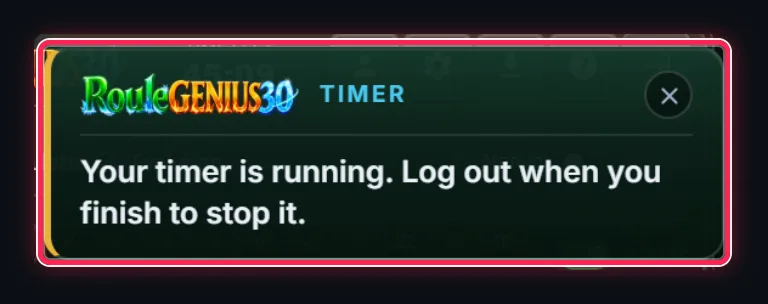
When you finish playing, click Logout so the minutes stop. The first time the minutes start, a small card reminds you:
3Roulette, Platform and Mode

- Roulette: the name of the active profile. RG2030 keeps the numbers of each table apart.
- Platform: the game provider of that table, for example Evolution.
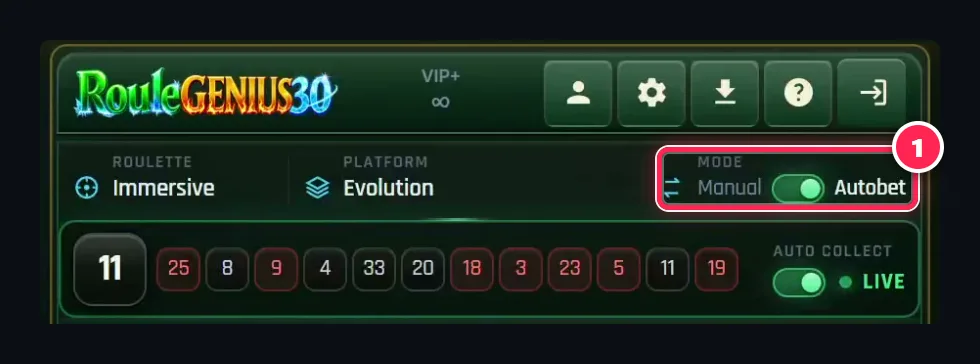
- Mode: Manual = you place the bets at the casino and RG2030 shows you the suggestions. Autobet Premium & up = the Bridge places the bets for you (part 10).
To change table, open My Account → Profiles and click Use, or choose it in the Bridge (Step 1).
4Latest numbers and Auto Collect

- The last number, big, in its colour.
- The 23 numbers before it. The newest is on the left.
- Auto Collect (needs the RG2030 Bridge): click the switch. It shows
...while it connects, then LIVE in green when the Bridge reads your table. From now on every new number arrives by itself.
Auto Collect shows OFF in red? Hold the mouse on the switch: it tells you why, for example Please open Live Roulette Table. or Please configure 2. History in RG2030 Bridge Addon. The same line appears in Last Updates. Fix it in the Bridge, then switch Auto Collect on again. No Bridge (for example on a phone)? Leave it off and add the numbers on the table (part 7).
5Spin Analysis Pro & up
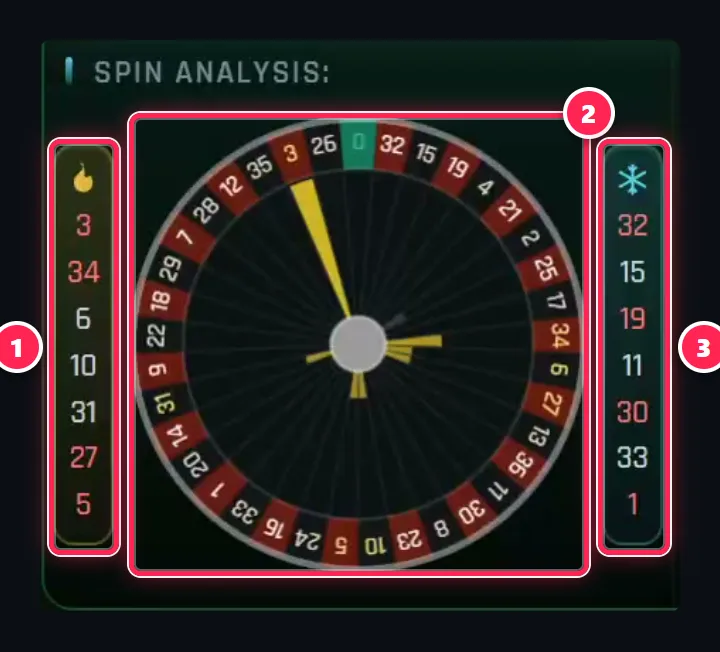
- Hot numbers (fire icon): the 7 numbers that came out most, the hottest at the top.
- The wheel: the longer the slice, the more often that number came out. Gold slices are hot, blue slices are cold.
- Cold numbers (snowflake): the 7 numbers that came out least, the coldest at the top.
Spin Analysis follows the choices you make in Stats (the chip or All, and Last).
6Stats: the percentages
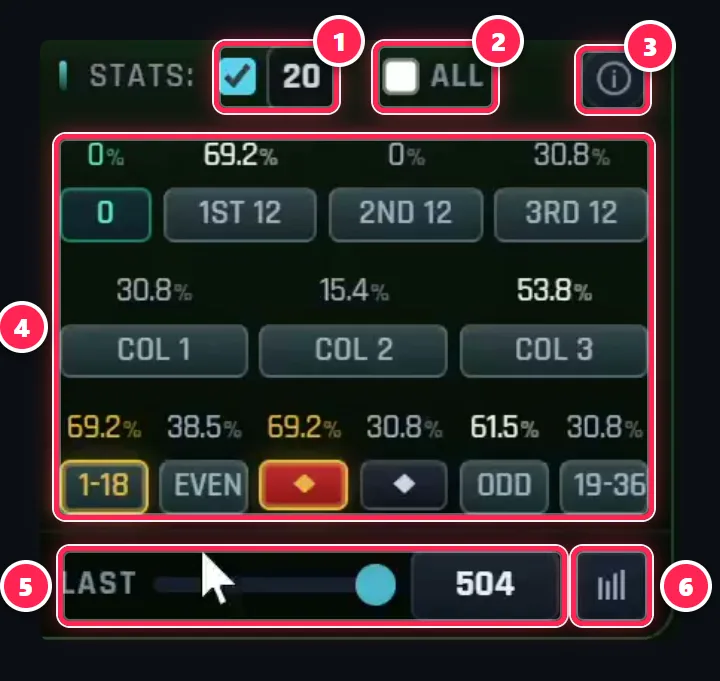
- The chip with the last number (ticked at the start): RG2030 counts only the spins that came right after this number in the past.
- All: RG2030 counts every spin. One of the two is always ticked.
ⓘ: explains the difference.- Three rows: zero and the dozens, the columns Pro & up, then 1-18, Even, Red ◆, Black ◆, Odd, 19-36.
- Last: how many past spins RG2030 uses (from 10 to 1000). Drag the slider or type a number and press Enter.
- The chart icon shows the numbers behind the percentages.
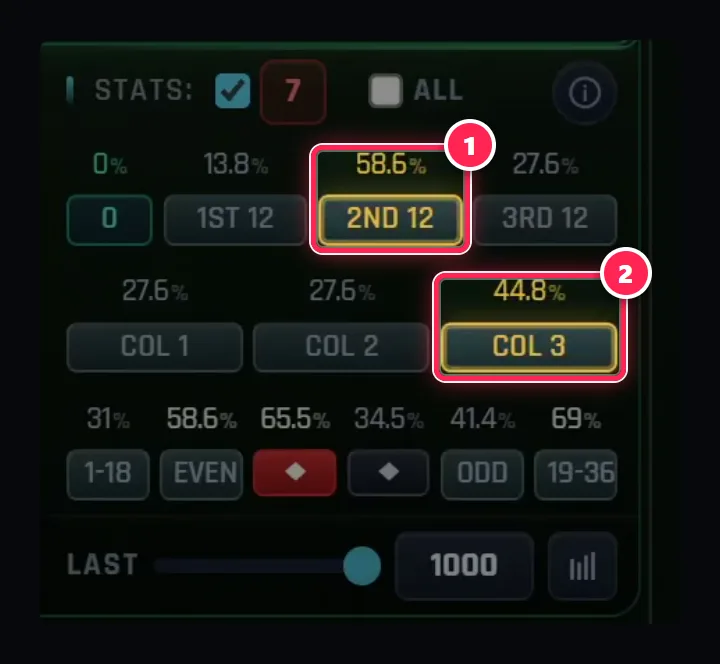
Gold cells are suggestions. A cell turns gold when it belongs to the strategy you chose in Settings and its percentage reached your Win Rate. Here the strategy is Rows/Dozen with a Win Rate of 36%: 12nd 12 and 2Col 3 are above it.
Your choice of chip or All, and of Last, also decides what Autobet bets on.
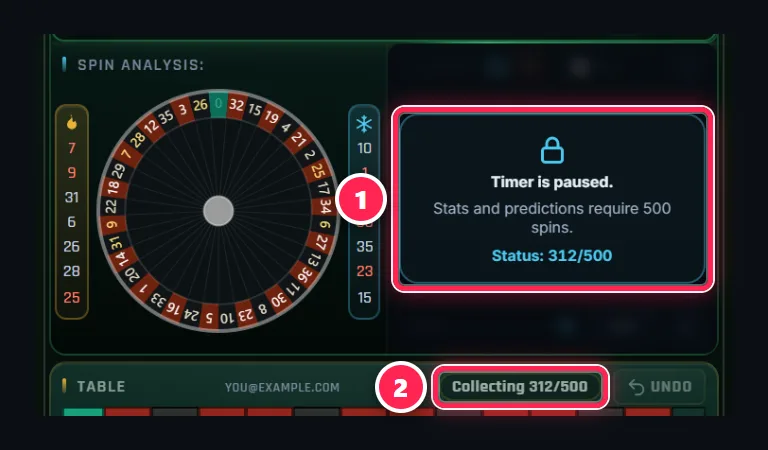
A card covers Stats? With fewer than 500 numbers on the table, RG2030 shows Timer is paused. Stats and predictions require 500 spins. and how many numbers it has, for example Status: 312/500. Keep collecting: at 500 the statistics open and the minutes start. The table shows the same count, for example Collecting 312/500.
7Table: add numbers and see the suggestions
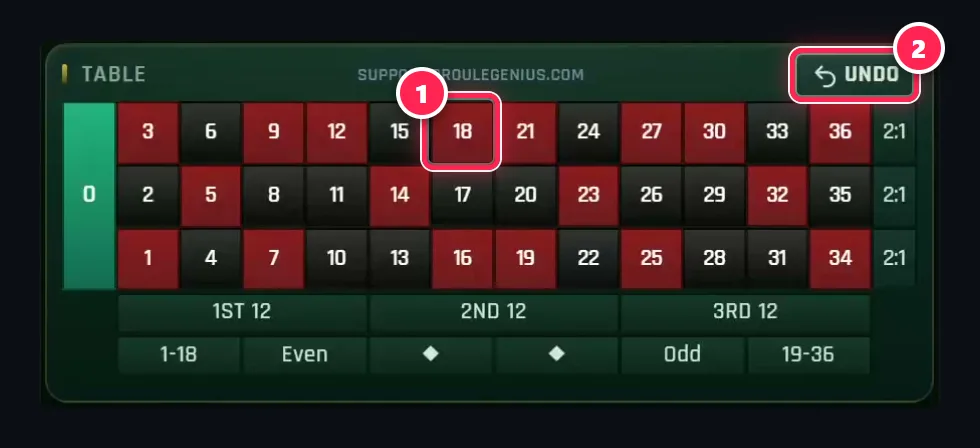
- After each spin, click the number that came out (0 to 36, and 00 on an American wheel). It becomes the big last number, and Last Updates says Manual spin added: 18. Only the numbers are buttons: dozens, columns and colours are labels.
- Undo removes the last number. It works only when RG2030 has more than 500 numbers, so click carefully while you collect the first 500.
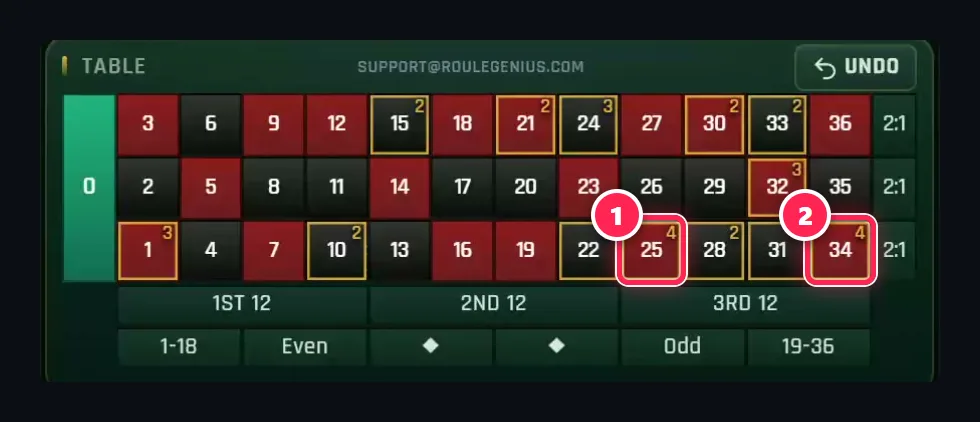
Suggested numbers Premium & up: with the Single Numbers strategy, RG2030 outlines the numbers to bet in gold. The small digit in the corner is how many signals point to that number: the higher, the stronger. Some spins have no suggestion: RG2030 waits for a better chance.
With Outside Bets or Rows/Dozen, the suggestion is a gold cell in Stats instead (part 6).
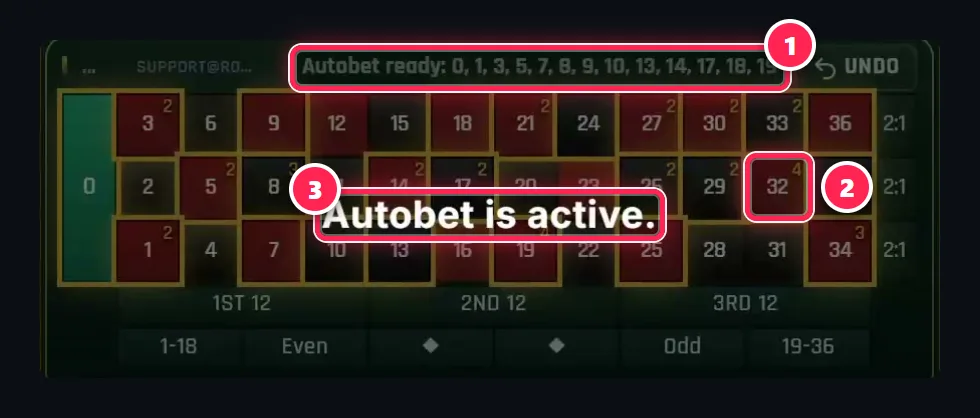
Autobet ready: …lists what Autobet is going to bet.- A chosen number, with its signal digit.
- Autobet is active. covers the table: you cannot click it, because the numbers arrive from the Bridge and the Bridge places the bets.
8Last Updates and Interesting Facts
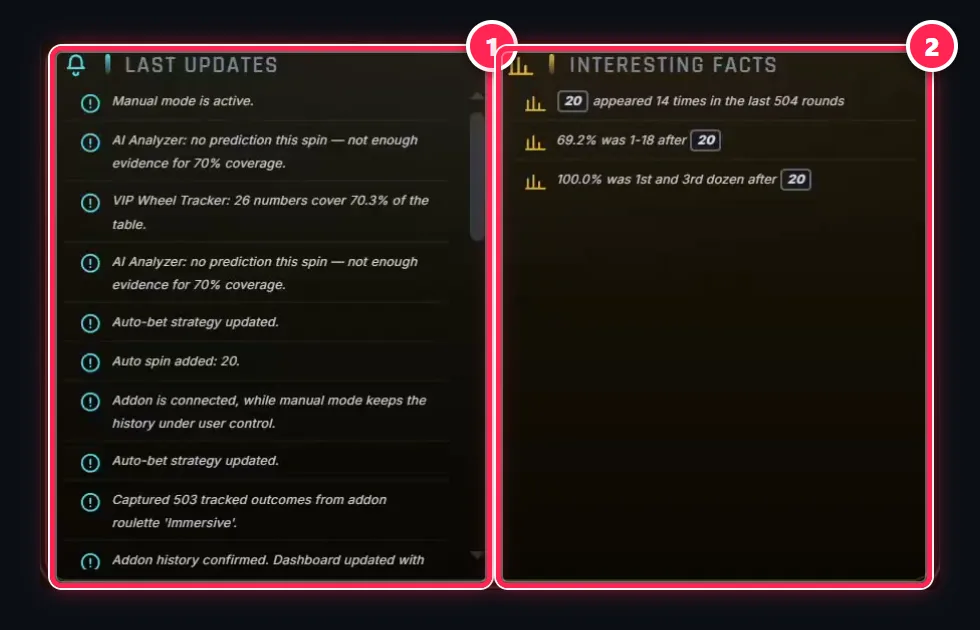
1Last Updates: messages from RG2030, the newest at the top. The box scrolls if there are many. 2Interesting Facts Pro & up: up to three facts about the last number, for example 69.2% was 1-18 after 20.
| Message in Last Updates | What it means |
|---|---|
| Predictions disarmed: 312/500 numbers collected. | Keep collecting. Predictions start at 500. |
| Addon connected. Live numbers are streaming in. | The Bridge sends the numbers by itself. |
| AI Analyzer: 26 numbers cover 70% of the table. | A Single Numbers suggestion is ready (gold numbers on the table). |
| … no prediction this spin — not enough evidence for 70% coverage. | No bet this spin. This is normal: RG2030 skips weak spins. |
| No bet command from server for this spin… | Autobet did not bet this spin: Mode is Manual, or the strategy found no chance. |
| Cannot remove: 480 numbers tracked and predictions need at least 500. | Undo works only above 500 numbers. |
| Autobet stopped: stop-loss reached (…) | Your Stop-loss or Take-profit switched Autobet off. |
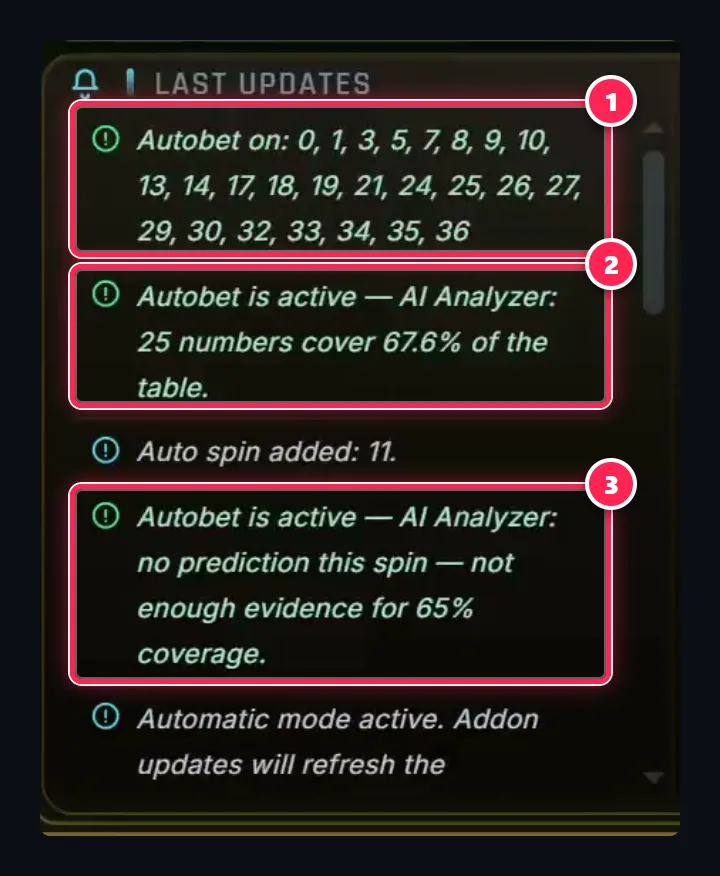
During Autobet, Last Updates tells you what happens at each spin:
- Autobet on: … the numbers RG2030 asked the Bridge to bet.
- … 25 numbers cover 67.6% of the table. how much of the table that bet covers.
- … no prediction this spin — not enough evidence for 65% coverage. no bet on this spin. This is normal.
9Menus and Settings
Every menu opens over the dashboard. Close it with Save, with the same icon again, or with Esc. Your changes are saved as soon as you make them: Save only closes the window.
My Account
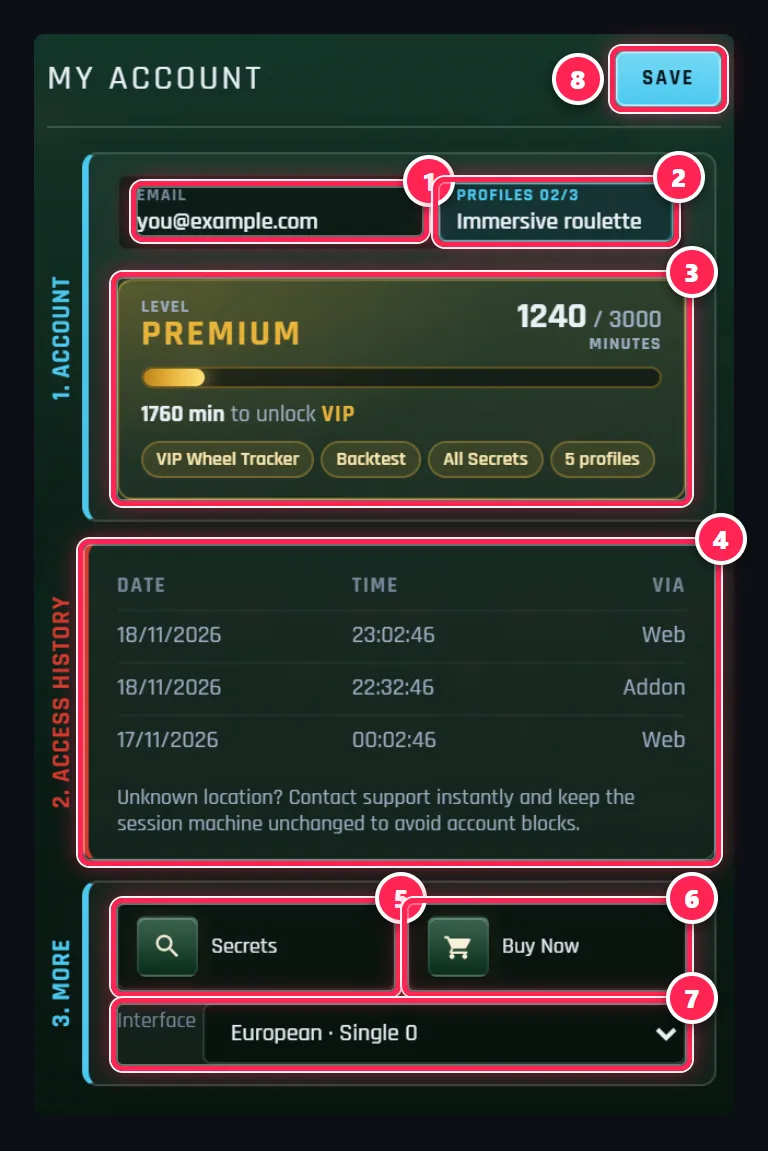
- Email of your account.
- Profiles: how many you use and how many your Pack allows (here 2 of 3), and the active table. Click it to open Roulette profiles.
- Your Pack (the app says Level): the minutes you bought, the bar to the next Pack and what it adds. Click it to see how to reach it.
- Access History: your last 3 sign-ins, from the web or from the Bridge (Addon). A sign-in you do not know? Contact support at once.
- Secrets: the 30 Secrets (below).
- Buy Now: opens the Packs page, to buy minutes.
- Interface: European wheel (single 0) or American wheel (double 00). It changes the table, the wheel and the zero cells.
- Save: closes My Account.
Roulette profiles
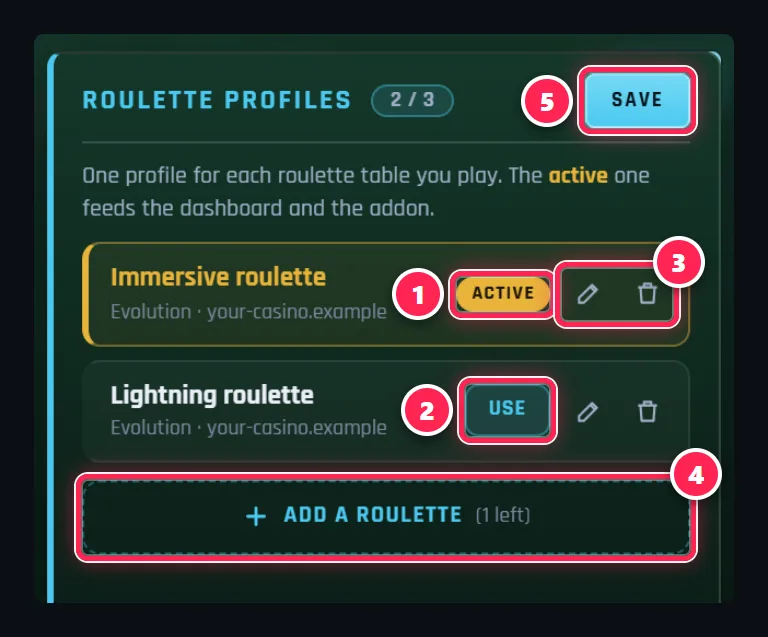
- Active: the table the dashboard and the Bridge work on now.
- Use: makes another table the active one. Its own numbers load.
- Pencil: change the platform or the website. Bin: delete the profile. RG2030 asks Delete?: Delete or Keep. Deleting also removes its numbers and its Bridge setup (history, bet grid, chips).
- + Add a roulette: type the name as the casino shows it, the platform (game provider) and, if you like, the website. Then Save roulette. It shows how many profiles you have left.
- Save: closes the window.
No active profile? Every menu opens this window first, because RG2030 saves the numbers of each table apart.
Secrets
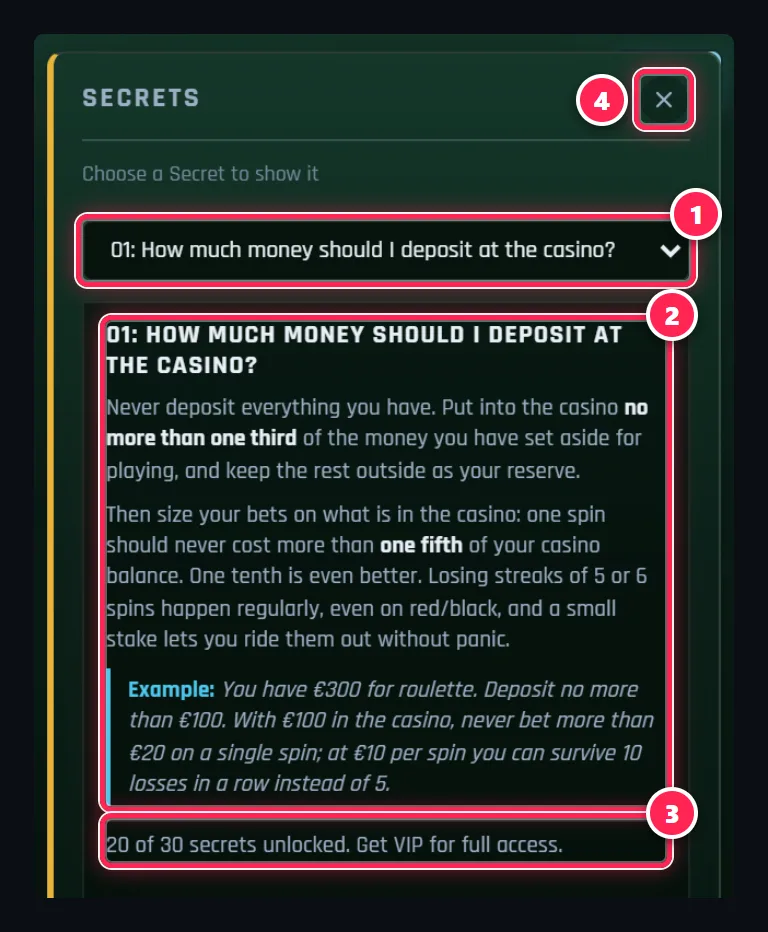
Thirty short lessons from our years at the tables, from How much money should I deposit at the casino? to Why should I keep a session log? Choose one in the list. Long Secrets have pages: ‹ Prev and Next ›.
The Introduction and the rules are open to everyone. Secrets 1-10 open with the Pro Pack, 11-20 with Premium, 21-30 with VIP. A locked one shows See how to unlock.
Settings
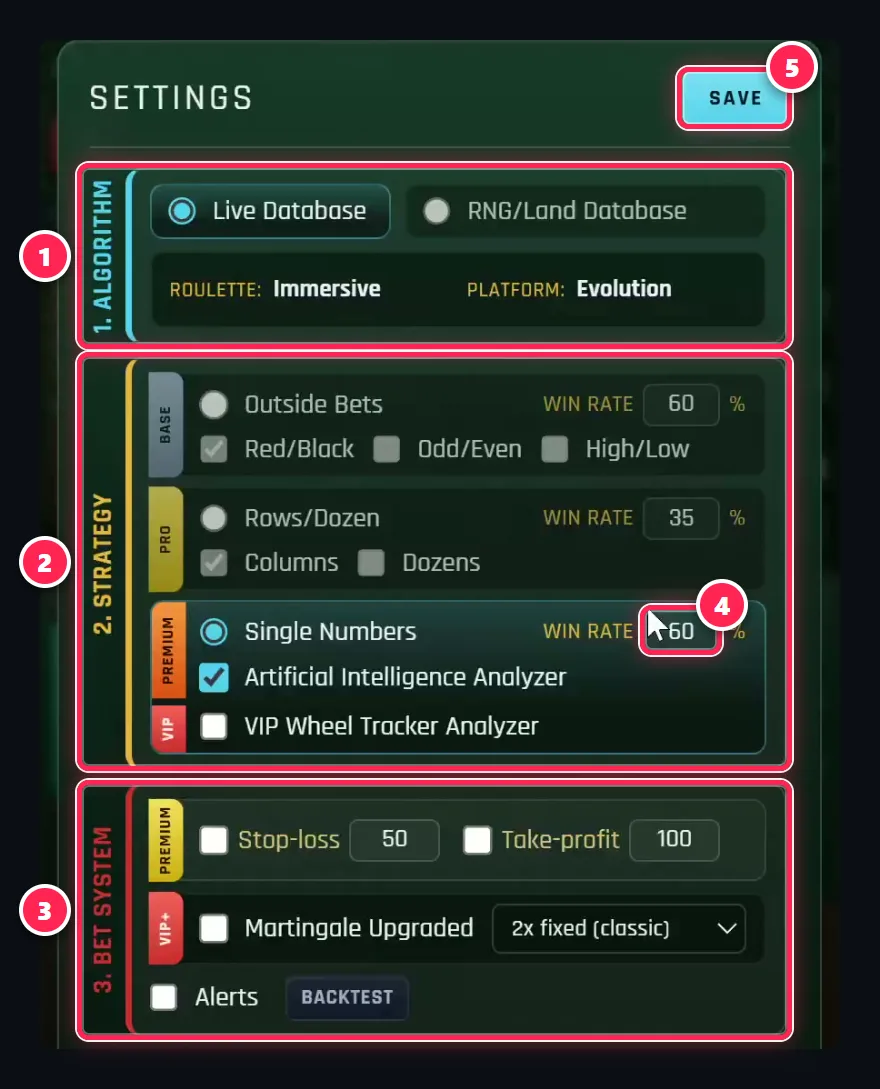
Opening Settings switches Autobet off
RG2030 does this on purpose, so it never bets while you change the strategy. Switch Autobet on again when you close Settings.
- 1. Algorithm: leave Live Database selected. It uses the numbers of your table and shows its Roulette and Platform.
- 2. Strategy: choose one strategy, its options and its Win Rate (table below).
- 3. Bet System: limits and options for Autobet (list below).
- Win Rate: type the number and press Enter (or click outside the box).
- Save closes Settings.
| Strategy | Pack | Options | Win Rate |
|---|---|---|---|
| Outside Bets | Base | Red/Black, Odd/Even, High/Low | 50-100% (start: 60%). The percentage a bet must reach in Stats before RG2030 suggests it. |
| Rows/Dozen | Pro | Columns, Dozens | 33-100% (start: 35%). Same idea, for dozens and columns. |
| Single Numbers | Premium | Artificial Intelligence Analyzer; VIP Wheel Tracker Analyzer (VIP) | 50-81% (start: 70%). Here the Win Rate is the part of the table you cover: 70% = 26 numbers, 81% = 30 numbers (the most a live table accepts). It is not a chance of winning. |
Wrong number? A red line under the box tells you the limit, for example Minimum win-rate 50% or Maximum win-rate 81%.
- Stop-loss and Take-profit Premium & up: tick them and type an amount. Autobet switches itself off when this session’s loss or win reaches it.
- Martingale Upgraded VIP+: after each loss in a row the stake grows by the factor you choose (for example 2x fixed (classic)); it goes back to the base stake after a win or after 6 losses. It needs at least 2 chips mapped in the Bridge.
- Alerts Pro & up: a sound, a gold flash on Stats and a small card when a suggestion reaches your Win Rate (Outside Bets and Rows/Dozen).
- Backtest VIP & up: replays your collected numbers with the strategy above and shows what Autobet would have done.
Install Addon and Guide
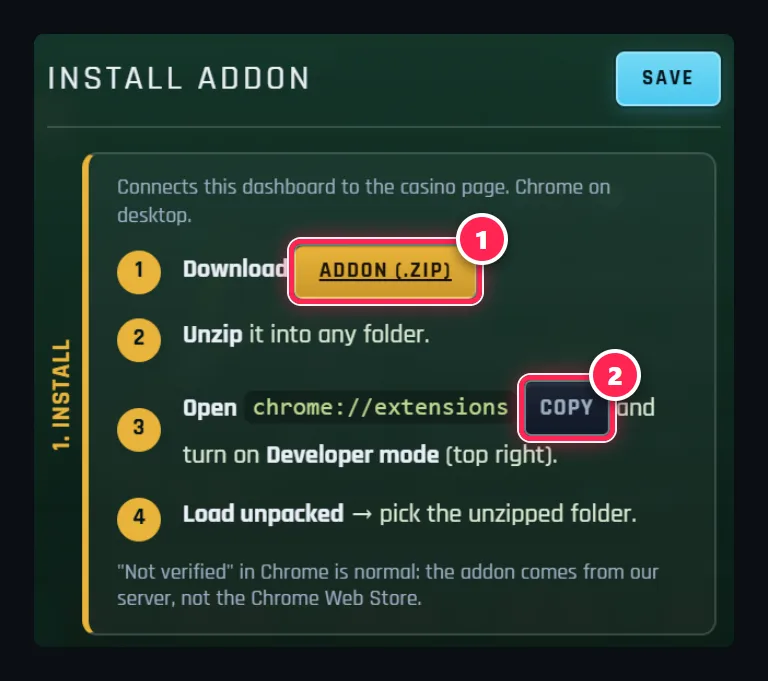
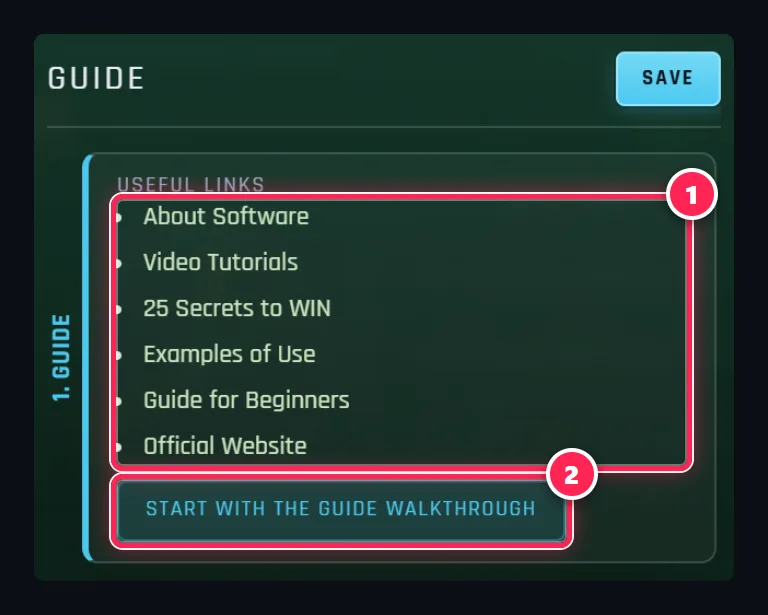
Install Addon downloads the RG2030 Bridge (Chrome on a computer) and shows the 4 install steps. The full guide with pictures is here. Guide opens useful links in a new tab: the software, the video tutorials, the beginner guide.
10Autobet: RG2030 bets for you Premium & up
Autobet needs
- The Premium Pack or higher, and minutes on your account.
- The RG2030 Bridge on a computer, with its 3 steps done: Profile, History and Bet Grid (Bridge guide).
- At least one chip mapped in the Bridge, and the Stake per bet chosen (Bridge → Step 3 → Chips).
- 500 numbers on the table.
- Choose your strategy and Win Rate in Settings, then close Settings.
- 1Move the Mode switch to Autobet. A gold frame appears around RG2030 and Last Updates says Automatic mode active.
- Watch the table: when your strategy finds a chance, the Bridge places the chips on the casino table by itself.
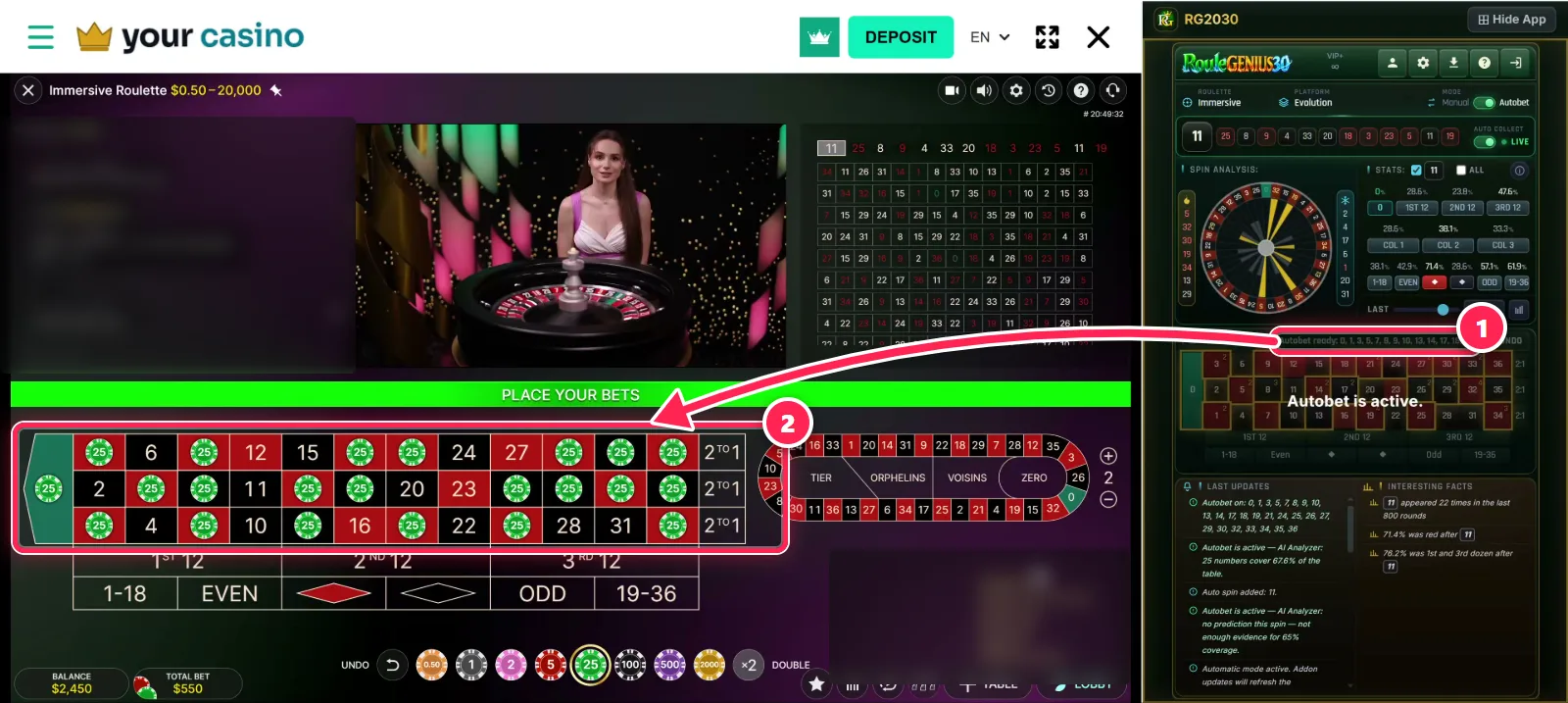
- Some spins have no bet. This is normal: Autobet waits for a spin that matches your strategy.
- To stop, move the switch back to Manual.
- Autobet also stops by itself when you open Settings, change table, reach your Stop-loss or Take-profit, run out of minutes, or when the casino tab is closed.
- Switch grey and nothing happens? Hold the mouse on it: it tells you what is missing, for example Autobet needs the addon’s 3rd panel (Bet Grid) mapped… or …no Chips are configured…. The same line is at the top of Last Updates.
11What each Pack unlocks
Every minute you buy counts towards your Pack, and you keep it forever. The app calls it your level.
| Feature | Base | Pro | Premium | VIP | VIP+ |
|---|---|---|---|---|---|
| Roulette profiles | 1 | 2 | 3 | 5 | 5 |
| Auto Collect, manual entry, Outside Bets, Red/Black · Odd/Even · High/Low stats | ✓ | ✓ | ✓ | ✓ | ✓ |
| Hot and cold numbers, dozens and columns stats, Interesting Facts, Rows/Dozen, Alerts | ✓ | ✓ | ✓ | ✓ | |
| Single Numbers (AI Analyzer), Autobet, Stop-loss and Take-profit | ✓ | ✓ | ✓ | ||
| VIP Wheel Tracker, Backtest | ✓ | ✓ | |||
| Martingale Upgraded, unlimited minutes | ✓ | ||||
| Secrets | 0 | 10 | 20 | 30 | 30 |
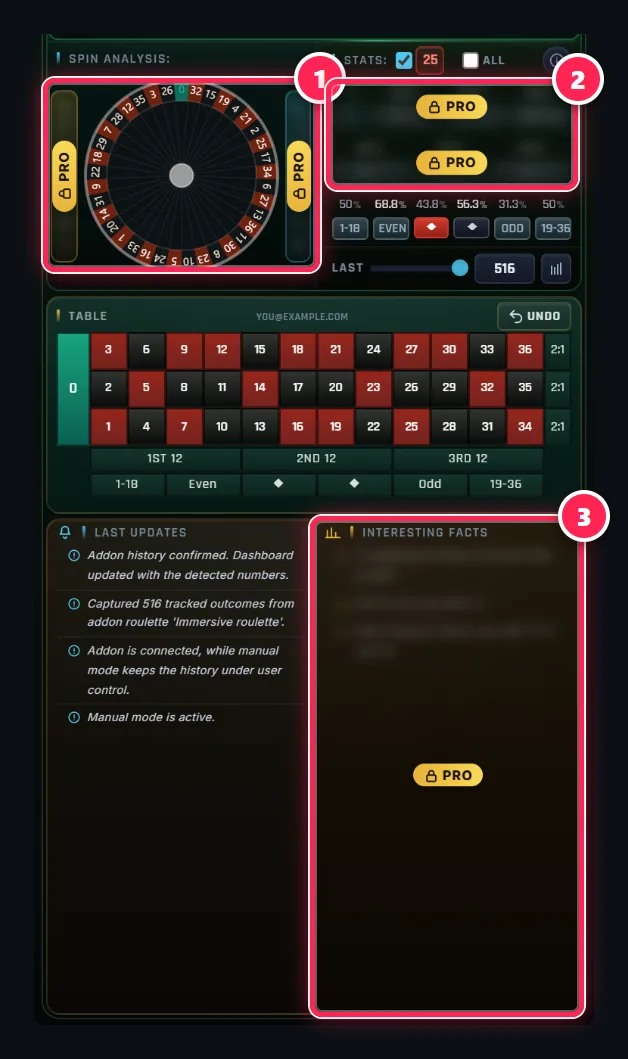
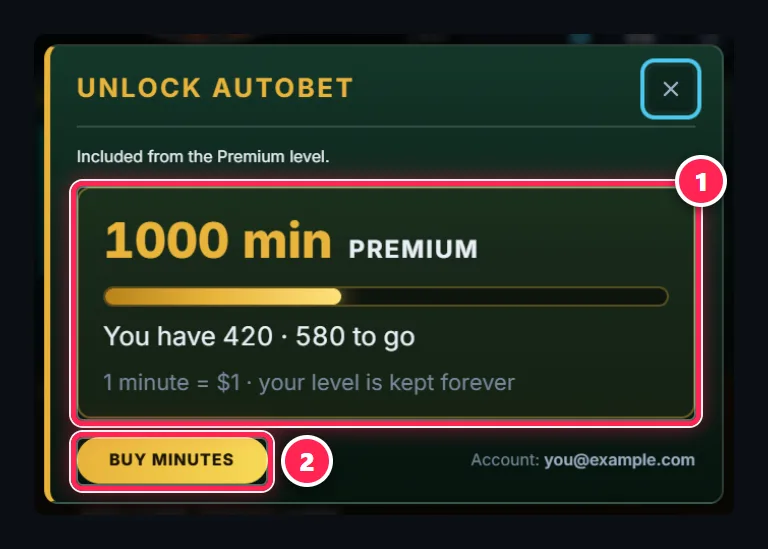
Locked parts stay visible: they are blurred, with a small gold badge that names the Pack that opens them. Hold the mouse on a locked part to see how many minutes you need. Click it to open a window with your progress and Buy minutes.
12Questions
I have minutes but I see no statistics
Statistics and predictions start at 500 numbers on the active table. Until then, Stats shows Timer is paused and your minutes do not run.
I clicked a wrong number and Undo is grey
Undo works only above 500 numbers. During the first 500, one wrong number makes little difference to the statistics.
I cannot click the table
Autobet is on: the table is covered by Autobet is active. Move Mode to Manual to use the table. No active profile? A click opens Roulette profiles: click Use on your table first.
Clicking Red, 1st 12 or 2:1 on the table does nothing
Only the numbers (0 to 36, and 00) are buttons. The other cells are labels.
Does a Win Rate of 70% mean I win 70% of the time?
No. For Single Numbers it is the part of the table the suggested numbers cover (70% = 26 numbers). For Outside Bets and Rows/Dozen it is the percentage a bet must reach in Stats before RG2030 suggests it. Roulette stays a game of chance: no setting can promise a win.
Where do I set the stake and the bet delay?
In the RG2030 Bridge, Step 3 → Chips: Stake per bet and Bet delay (seconds).
Autobet switched itself off
It happens when you open Settings, change table, reach your Stop-loss or Take-profit, run out of minutes, or close the casino tab. Last Updates tells you which one. Switch it on again.
The Martingale is ticked but the stake does not grow
It needs at least 2 chips mapped in the Bridge (Step 3 → Chips) and the VIP+ Pack. The line under Bet System says how many chips are mapped.
Logout also signed me out of the Bridge
Yes: one Logout ends your session everywhere. Sign in again in the Bridge, or open RG2030 in Chrome and the Bridge signs in by itself.
I use a phone. Can I use RG2030?
Yes, in the browser of your phone or tablet. The RG2030 Bridge works only in Chrome on a computer, so on a phone you add each number on the RG2030 table and place the bets yourself.


